 Jim Apps
Orbit for Gremlin: graph queries in JetBrains IDEs
Orbit for Gremlin is a Gremlin plugin for IntelliJ IDEA, PyCharm and every JetBrains IDE. Run Gremlin on Amazon Neptune, JanusGraph, Azure Cosmos DB or Gremlin Server in the IDE and see the answer as a graph or a table, without switching to the Gremlin Console or a notebook. Completion knows your graph: vertex labels, edge labels and property keys come from the server you are connected to.
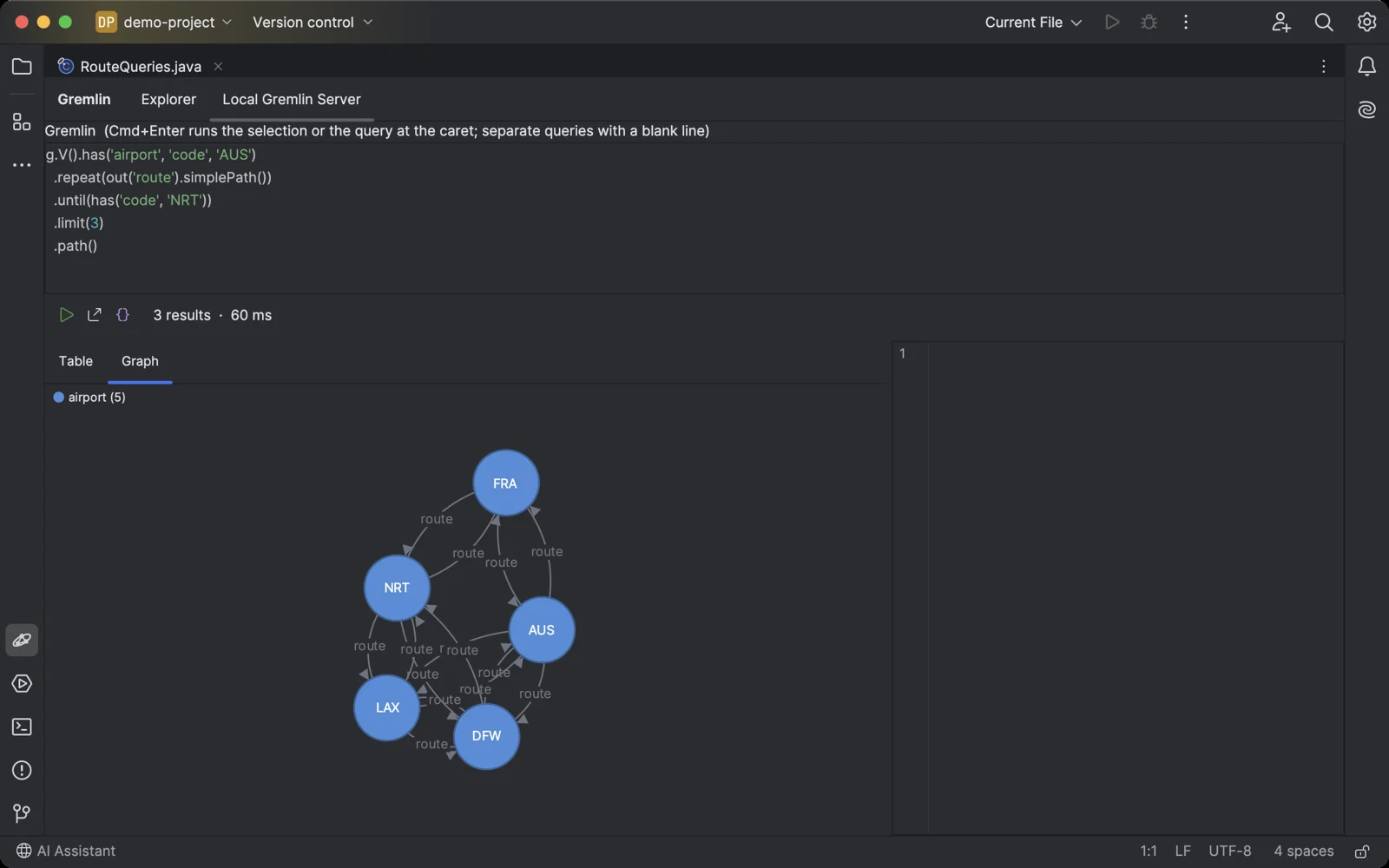
The paths a Gremlin query found, drawn as a graph with the routes between their airports.
Why a Gremlin plugin for JetBrains IDEs
The database tools built into JetBrains IDEs speak SQL over JDBC, and Gremlin servers speak Gremlin over WebSocket. Developers keep the Gremlin Console, a notebook or the Azure portal open in another window to check what their code just wrote. The last Gremlin plugin for JetBrains IDEs stopped at version 2024.3.
What Orbit for Gremlin does
- Results as a graph Vertices and edges are laid out for you. Drag a vertex, pan, zoom, and click anything to read its label and properties. Edges between the returned vertices and the end vertices of returned edges are drawn too, so a plain g.V() still shows how things connect.
- Run Gremlin from your code Put the caret in a query string in Java, Kotlin, Python, JavaScript, C# or any other language, or in a .gremlin file, and press Ctrl+Shift+Alt+Enter (Cmd+Shift+Option+Enter on macOS). Select text to run exactly that.
- Gremlin that knows your graph Highlighting, plus completion of steps, predicates and tokens, and of vertex labels, edge labels and property keys read from the connected graph.
- Tables and JSON Vertices and edges become rows by id, label and properties, valueMap() and project() results become columns. Select a row to see it as JSON, or export the result as CSV or JSON.
- CSV into the graph Import a CSV file as vertices. With a key column a second import updates the vertices instead of duplicating them. Paid.
- Safe with big graphs Labels in the tree come from a sample, not a full scan, and results stop at 1000, so a query without a limit cannot freeze the IDE or run up a bill.
- Read-only when it matters Mark a connection read-only and the plugin refuses scripts that add, change or drop vertices, edges and properties. Use it for production, together with a read-only user, key or IAM policy.
- The graph database you already run Apache TinkerPop Gremlin Server, JanusGraph and ArcadeDB, with or without a password; Amazon Neptune with IAM authentication from your AWS profile, or without it; Azure Cosmos DB for Apache Gremlin with its key. Tested on Gremlin Server 3.7, JanusGraph 1.1 and ArcadeDB.
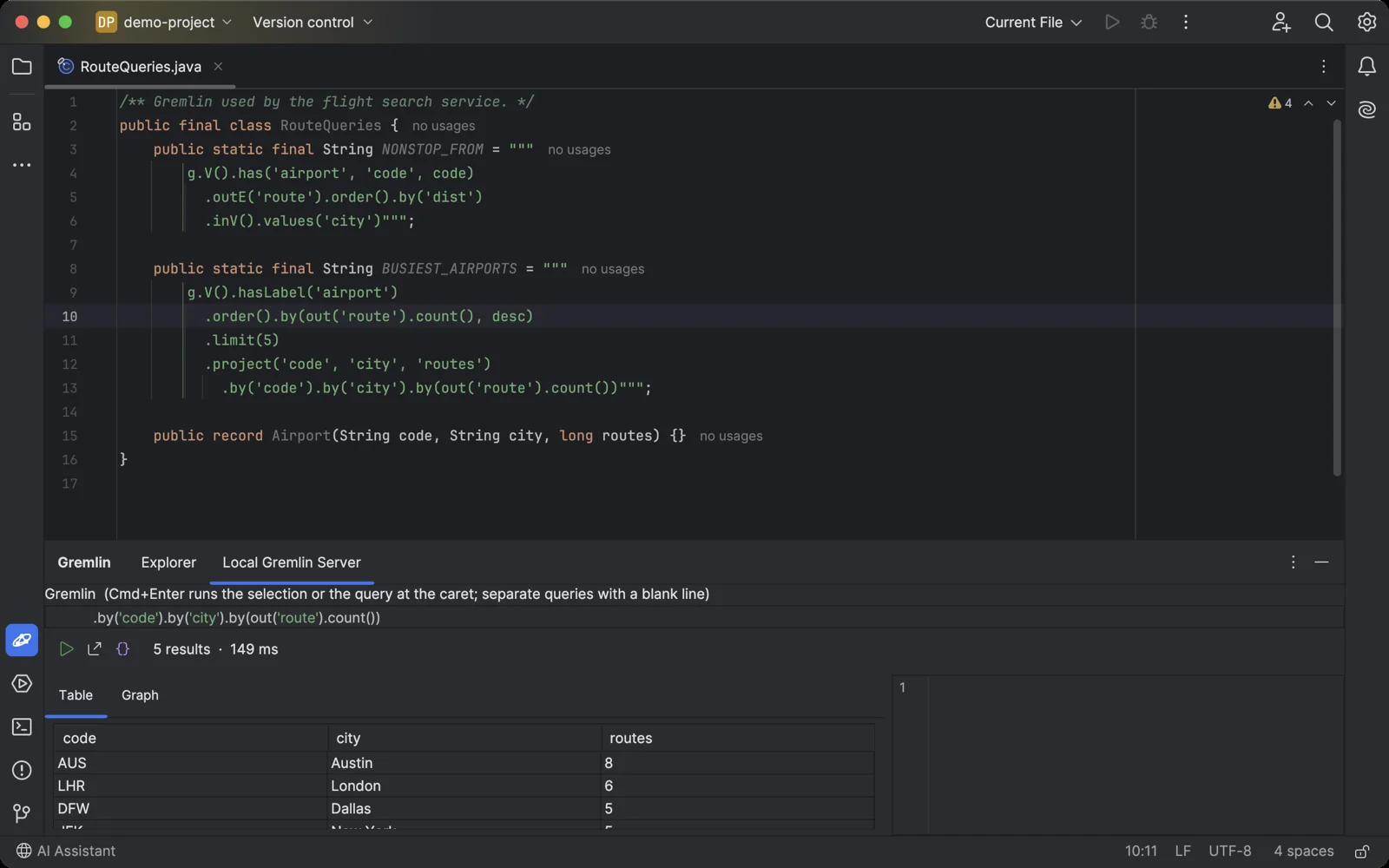
The caret in a query string in your code, one shortcut, and the result is in the console.
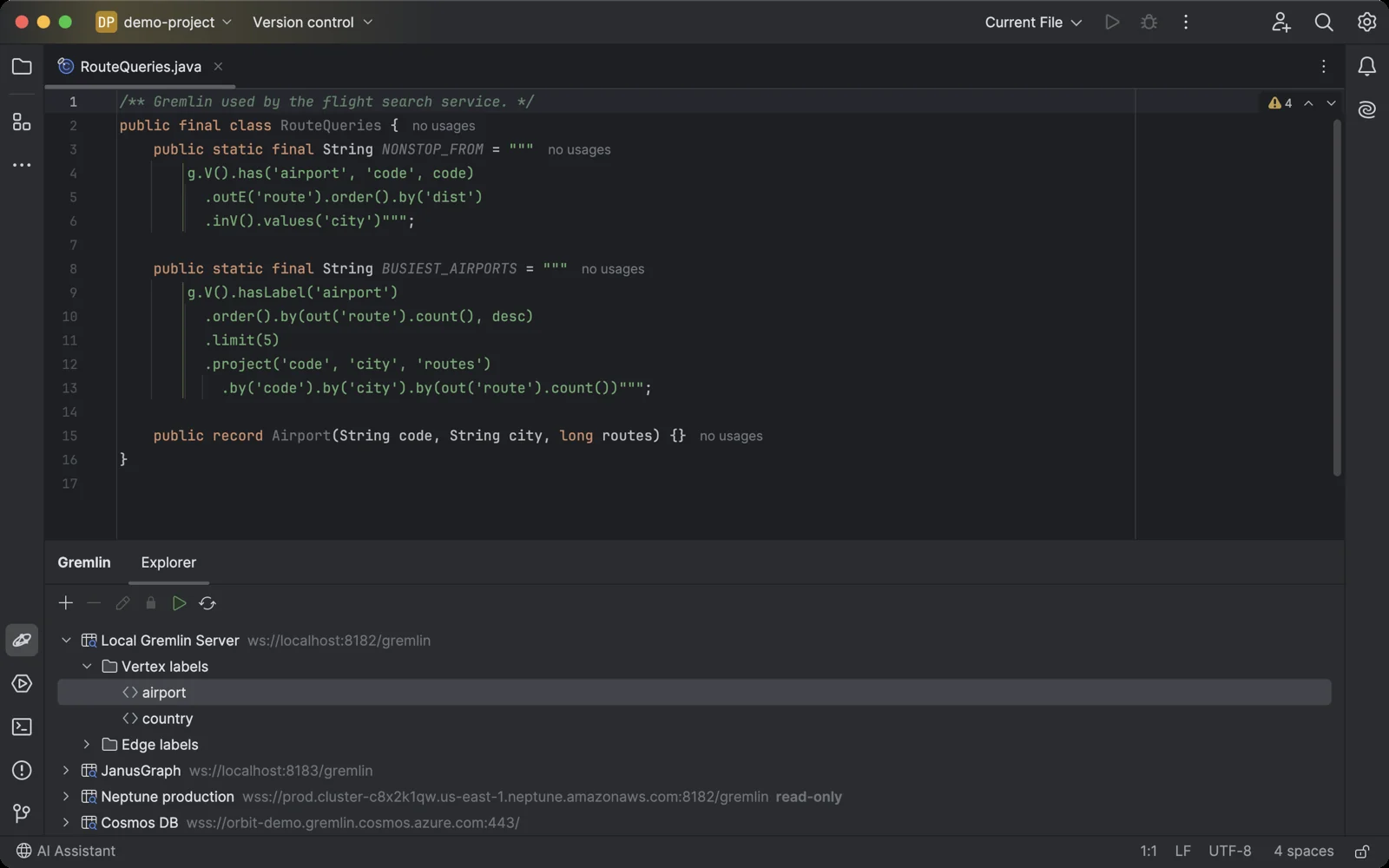
The Gremlin tool window sits under your code, like any other IDE tool. Double-click a label to see its first vertices or edges.
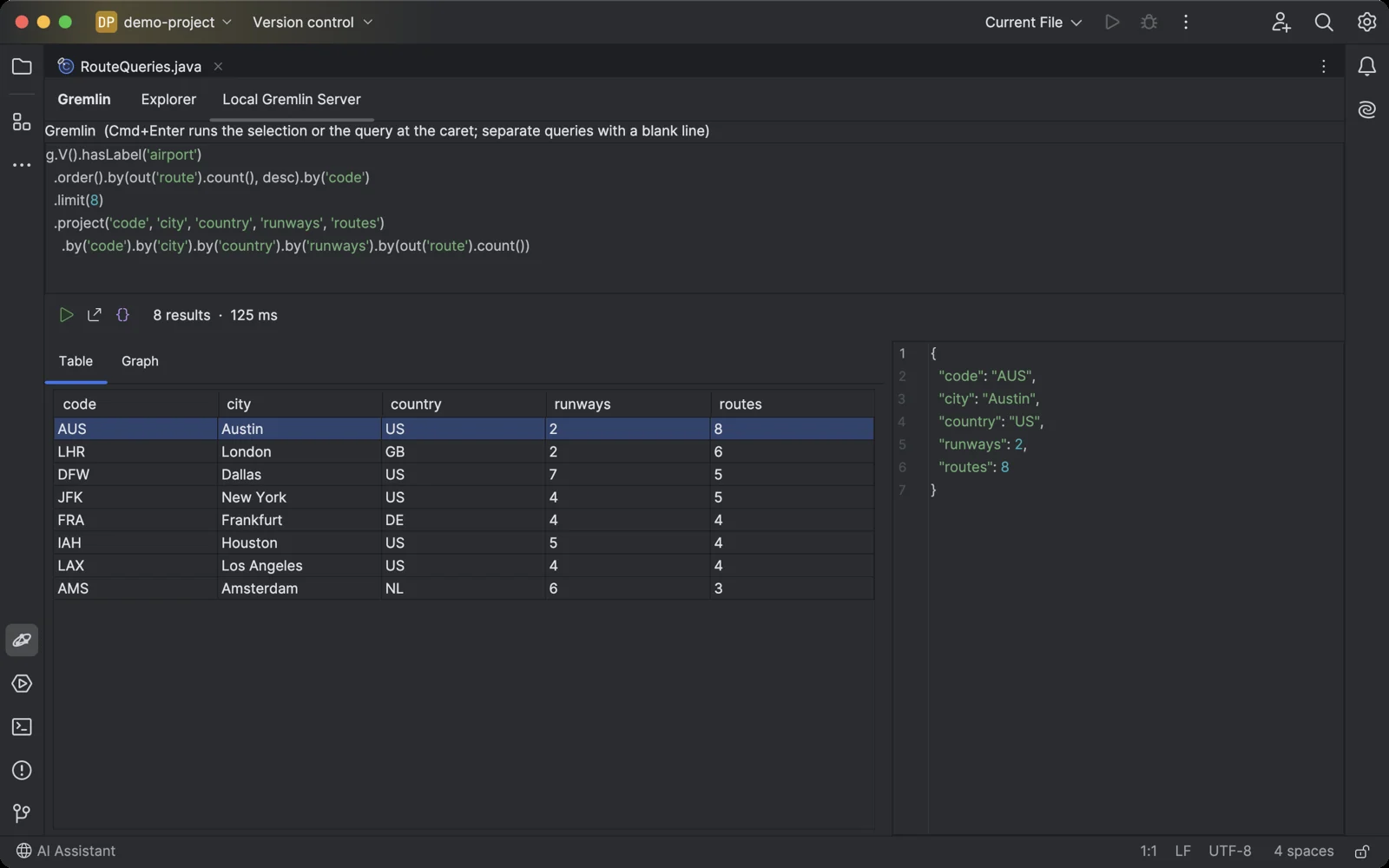
A project() query as a table, and the selected row as JSON.
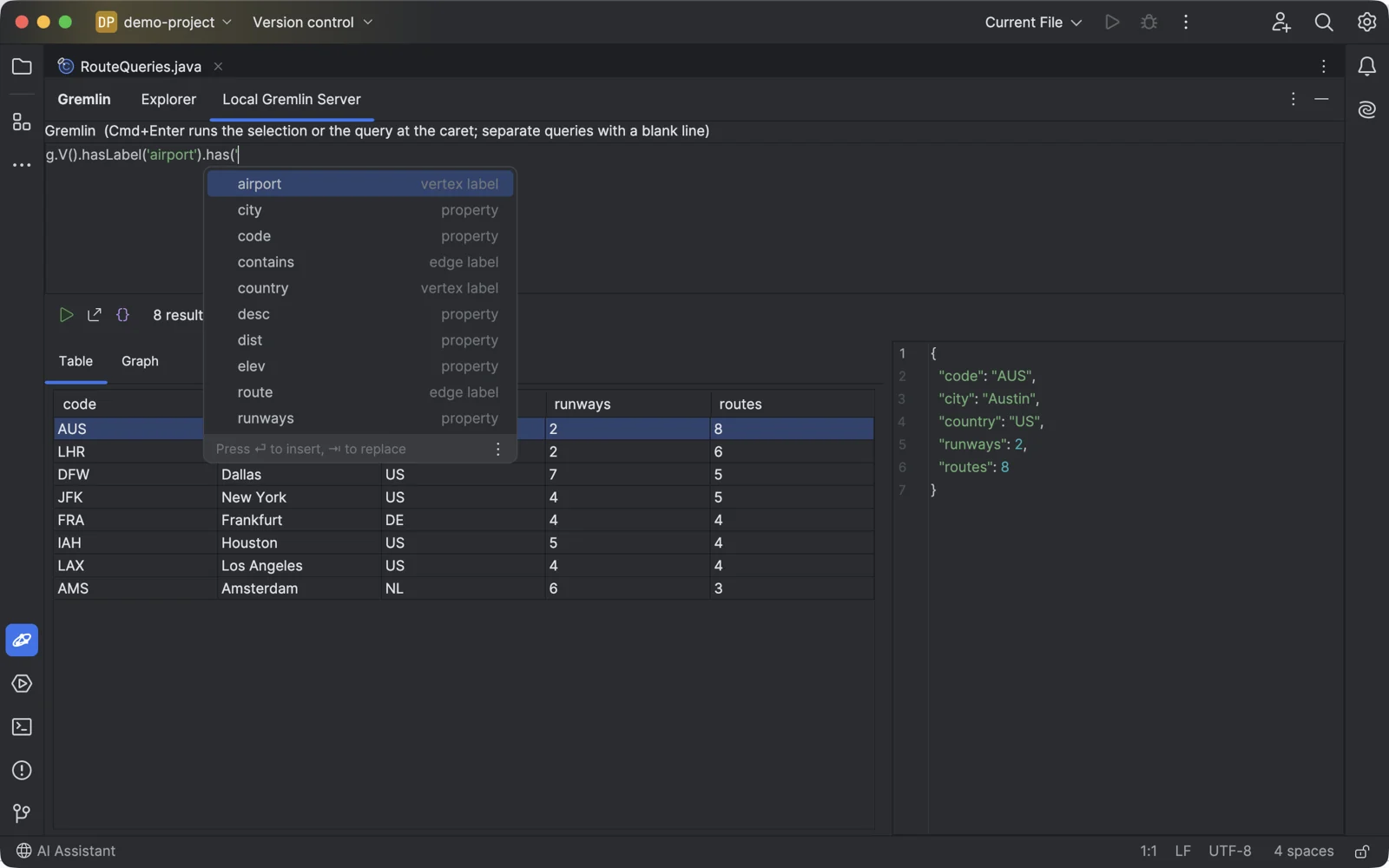
Completion offers the labels and property keys of your graph.
Getting started in your JetBrains IDE
- Install Orbit for Gremlin in the IDE: Settings → Plugins → Marketplace, search for "Orbit for Gremlin".
- Open the Gremlin tool window at the bottom of the IDE and click +.
- Choose the server. Gremlin Server, JanusGraph, ArcadeDB or Neptune without IAM: the URL
(
ws://localhost:8182/gremlinfor a local server) and a user and password if the server has them. Amazon Neptune with IAM: the endpoint URL and an AWS profile from~/.aws/credentials. Azure Cosmos DB:wss://your-account.gremlin.cosmos.azure.com:443/, the database and graph, and the key. Click Test Connection. - Expand the connection to see its vertex and edge labels. Double-click a label to see its first vertices or edges, or select the connection and click Run to open a query console.
- Write Gremlin and press Cmd+Enter (Ctrl+Enter on Windows and Linux). To run a query from your code, put the caret in it and press Cmd+Shift+Option+Enter (Ctrl+Shift+Alt+Enter).
Orbit for Gremlin pricing
Free trial, then a subscription sold through JetBrains Marketplace: $3 a month or $30 a year for personal use, $7 a month or $70 a year for organizations. Every feature works during the trial. After it, the free version keeps one read-only connection and shows the first 10 results of a query; a license unlocks any number of connections, changes, all results and CSV import. If you used a connection before the free version was limited, your first connection stays free with everything it had.
More plugins and apps
Other databases in the same IDEs: Orbit for Neo4j, Orbit for Cosmos DB and Orbit for InfluxDB. All products.
Orbit for Gremlin is not affiliated with the Apache Software Foundation, Amazon, Microsoft, the Linux Foundation or Arcade Data. Apache TinkerPop, TinkerPop and Gremlin are trademarks of the Apache Software Foundation; Amazon Neptune is a trademark of Amazon.com, Inc.; Azure Cosmos DB is a trademark of Microsoft Corporation; JanusGraph is a trademark of the Linux Foundation; ArcadeDB is a trademark of Arcade Data Ltd. Questions: contact@jimapps.dev